 Whiteboard Animation
教育 · 化學課 · 1:08
蒸餾白板動畫
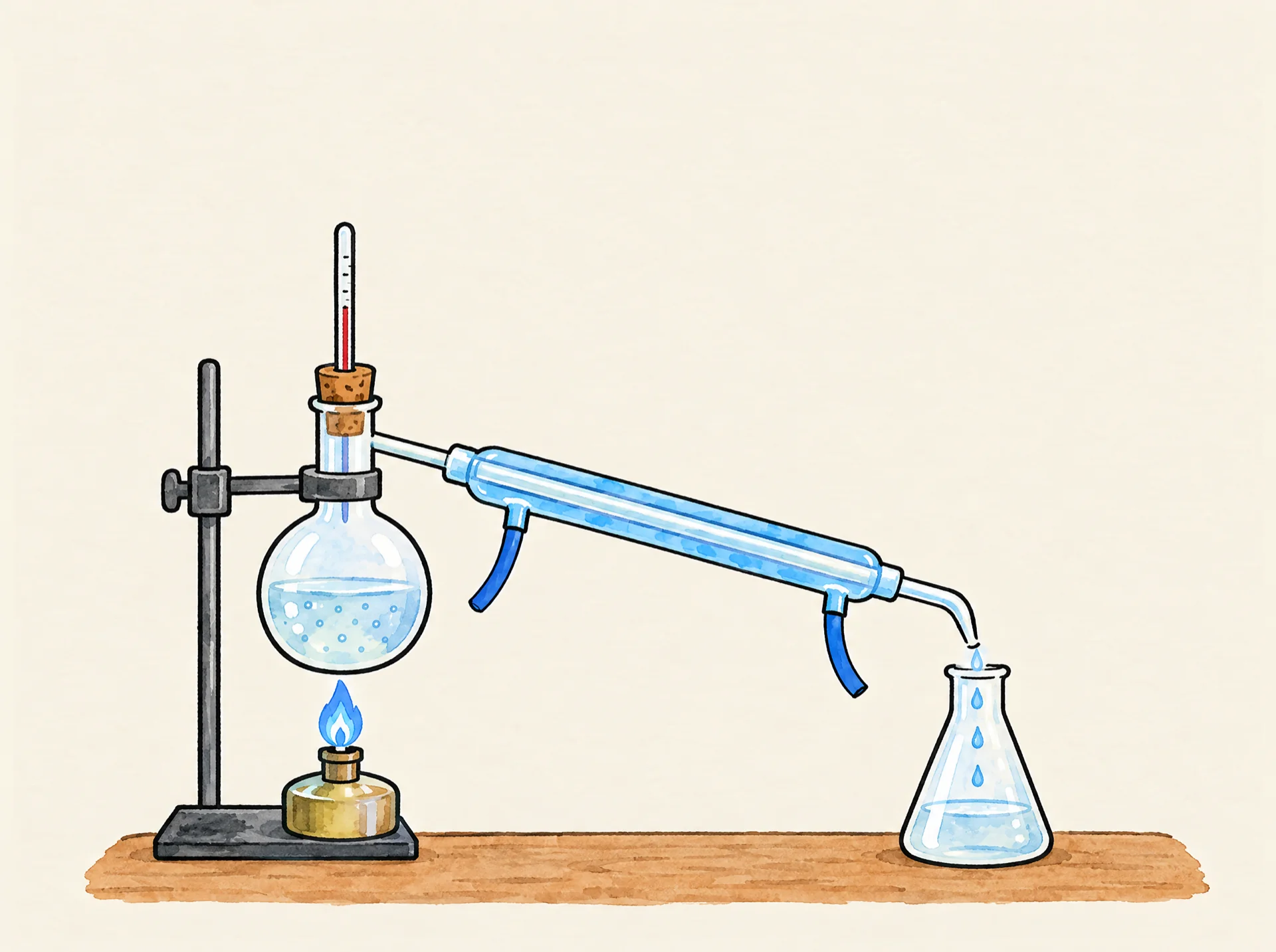
看一套簡單的蒸餾裝置一步步畫出來:酒精燈加熱用軟木塞塞住的圓底燒瓶,蒸氣經過斜放的冷凝管,滴進右邊的錐形瓶。一段由一張插畫做成的手繪白板動畫。
- 長度
- 1:08 · 2 個章節
- 畫面比例
- 4:3
- 開始上色
- 0:31
- 風格
- 線稿 + 上色
- 格式
- 16:9 · 1:1 · 9:16
它開始時的那張圖
這段繪製只用了這一張完成的插畫。上傳一張類似的圖,Studio 就會一筆一筆把它畫出來;我們不會從文字生成圖片。
1920 × 1433 px · WEBP
這張圖背後的提示詞
Hand-drawn simple laboratory distillation setup on a table, seen from the front, left to right: on the left, a small spirit burner with a blue flame heats one round-bottom glass flask of liquid held up by a clamp stand. The top of the flask neck is tightly closed with one cork stopper, and one thin thermometer pokes down through the cork into the neck. From a side arm on the neck, one straight glass condenser tube slopes downward to the right, wrapped in an outer glass jacket of cool blue water with one small hose at each end. At the lower right end of the condenser, clear drops fall into one conical (Erlenmeyer) flask that holds a little clear collected liquid. Only these things: the burner, the flask with its cork and thermometer, the clamp stand, the sloping condenser and the conical flask. Nothing else in the picture, plenty of empty space above. Coloured pencil and watercolour marker, clean black ink outlines, warm off-white paper, no text.這張圖由圖像模型生成;任何完成的插畫都能用同樣的方式繪製,包括你自己畫的。可以把提示詞當作起點,改成你自己的主題。提示詞保留當初使用的英文原文。
這段影片是怎麼做的
上面的圖由圖像模型根據上面的提示詞生成,再由 WhiteboardAnimation.ai 一筆一筆畫成頁面頂端的這段影片。
- 繪製於
- 消耗點數
- 1
製作紀錄
第一張圖裡,加熱的燒瓶口是敞開的,蒸氣會跑掉;重新出圖時加上了軟木塞和溫度計。講解對照了大英百科全書關於蒸餾的條目。
常見問題
關於這個範例
Pro 方案包含商用授權:可將白板動畫片段用於客戶專案、講解影片、廣告和付費課程。免費方案和 Starter 方案的片段僅限個人及非商業用途。
一張完成的圖片,支援 PNG、JPEG 或 WebP,最大 10 MB。插畫、圖表和平面作品效果最好,也正是塗鴉影片和講解影片常用的那類畫面。
大約十五秒後,手繪動畫就開始繪製。影片時長由你決定,儲存還需幾秒鐘。