 Whiteboard Animation
Education · Science lesson · 1:37
Nitrogen cycle diagram animation
Watch a nitrogen cycle diagram drawn step by step: lightning, a bean plant with bumps on its roots, bacteria in the soil, a cow and its droppings, joined by arrows. A hand-drawn whiteboard animation made from one illustration.
- Length
- 1:37 · 2 chapters
- Aspect ratio
- 4:3
- Colour starts at
- 0:58
- Style
- Lines + colour
- Formats
- 16:9 · 1:1 · 9:16
By Deniffer AlanPublished Tested by Deniffer Alan
Opens Studio with this picture, ready to draw.
Your own picture? How to prepare one
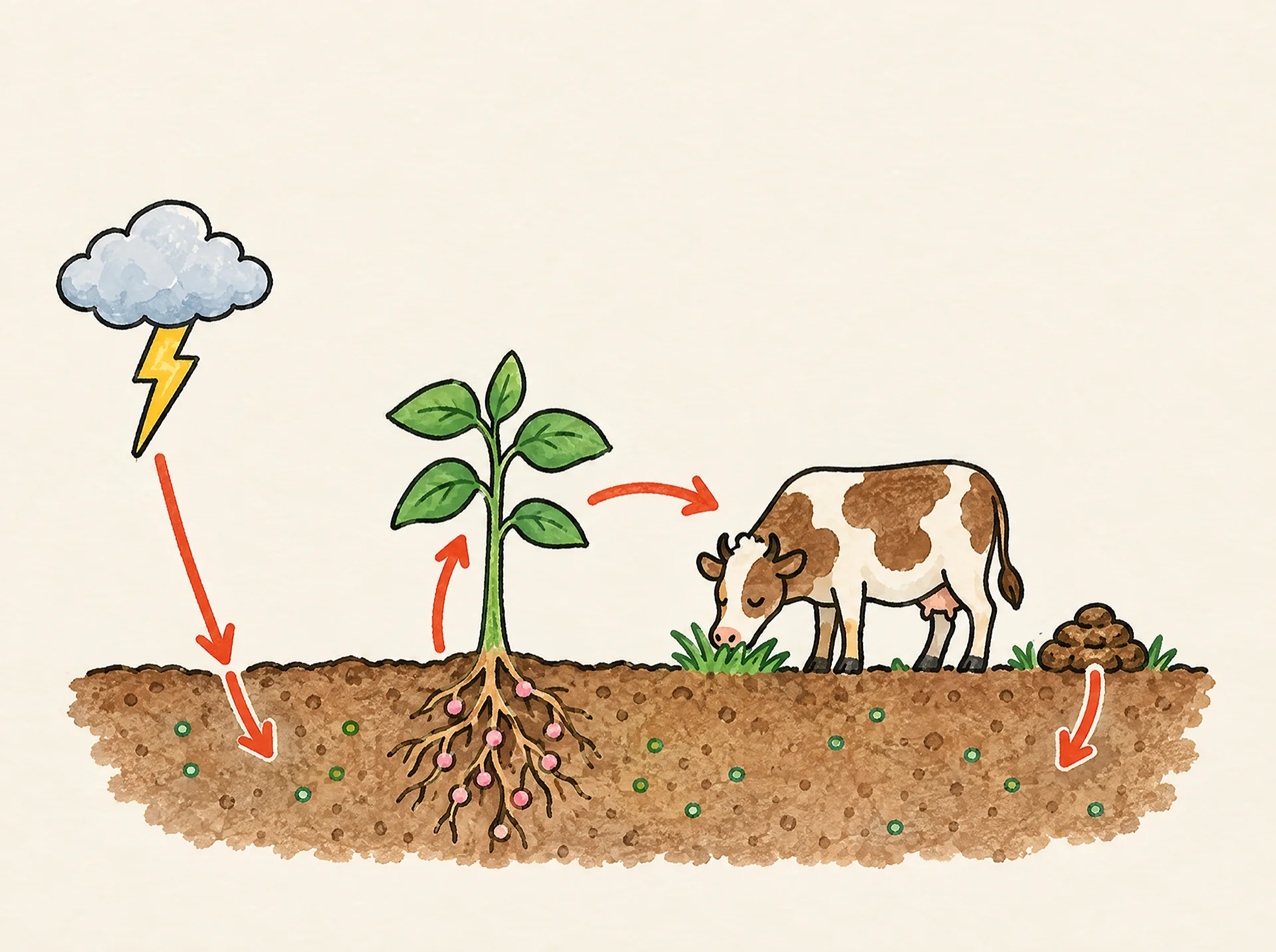
The picture it starts from
This finished illustration is all the drawing started from. Upload a picture like it and Studio draws it stroke by stroke; we don't generate pictures from text.
1920 × 1433 px · WEBP
The prompt behind the picture
Hand-drawn simple nitrogen cycle scene on a strip of brown soil, cut away so the underground is visible. Exactly five things: on the far left, one small grey cloud with one yellow lightning bolt; in the middle-left, one green bean plant whose roots underground carry small round pink bumps (root nodules); in the middle-right, one cow eating grass; just behind the cow, a small pile of droppings on the ground; scattered in the soil, a few tiny green dots of bacteria. Exactly four curved red arrows: one arrow pointing DOWN from the lightning bolt into the soil; one arrow pointing UP from the soil into the bean plant's stem; one arrow pointing from the bean plant across to the cow; one arrow pointing DOWN from the droppings into the soil. No arrow points up to the cloud. Nothing else in the picture, plenty of empty sky. Coloured pencil and watercolour marker, clean black ink outlines, warm off-white paper, no text.The picture came from an image model; any finished illustration works the same way, including one you drew. Use the prompt as a starting point for your own topic.
How this clip was made
The picture above was made with an image model from the prompt above; WhiteboardAnimation.ai then drew it, stroke by stroke, as the clip at the top of this page.
- Drawn
- Credits used
- 1
Notes from making it
The first picture had an arrow from the soil up to the storm cloud and none coming down from the lightning, so it was made again with the arrow pointing down into the soil. The narration was checked against Britannica’s article on the nitrogen cycle.
Nitrogen cycle, step by step
A script to read over it, timed to the drawing: the lines go down first and the colour arrives on the last beat.
- 0:00Line artEvery living thing needs nitrogen to build its body. About 78 percent of the air is nitrogen gas, but most living things can’t use it as it is.
- 0:12Lightning changes a small amount of that nitrogen into a form living things can use.
- 0:24Most of this work is done by bacteria. Some bacteria live together with bean plants and make nitrogen that the plants can use.
- 0:35Plants take up nitrogen to grow. Animals, like this cow, get their nitrogen by eating plants.
- 0:47ColourTiny living things in the soil break down droppings and dead plants and animals into ammonia. Other bacteria turn the ammonia into nitrates, which plants use again.
- 0:59Some bacteria turn nitrates back into nitrogen gas in the air, and the cycle goes on.
Where this nitrogen cycle diagram animation fits
Use it in a science lesson on nutrient cycles, next to the water cycle to compare the two, or as a short clip in a nature video for kids. The same process turns your own diagram into a clip.
- Education
- Explainer videos
- Science
- Nature
Questions