 Whiteboard Animation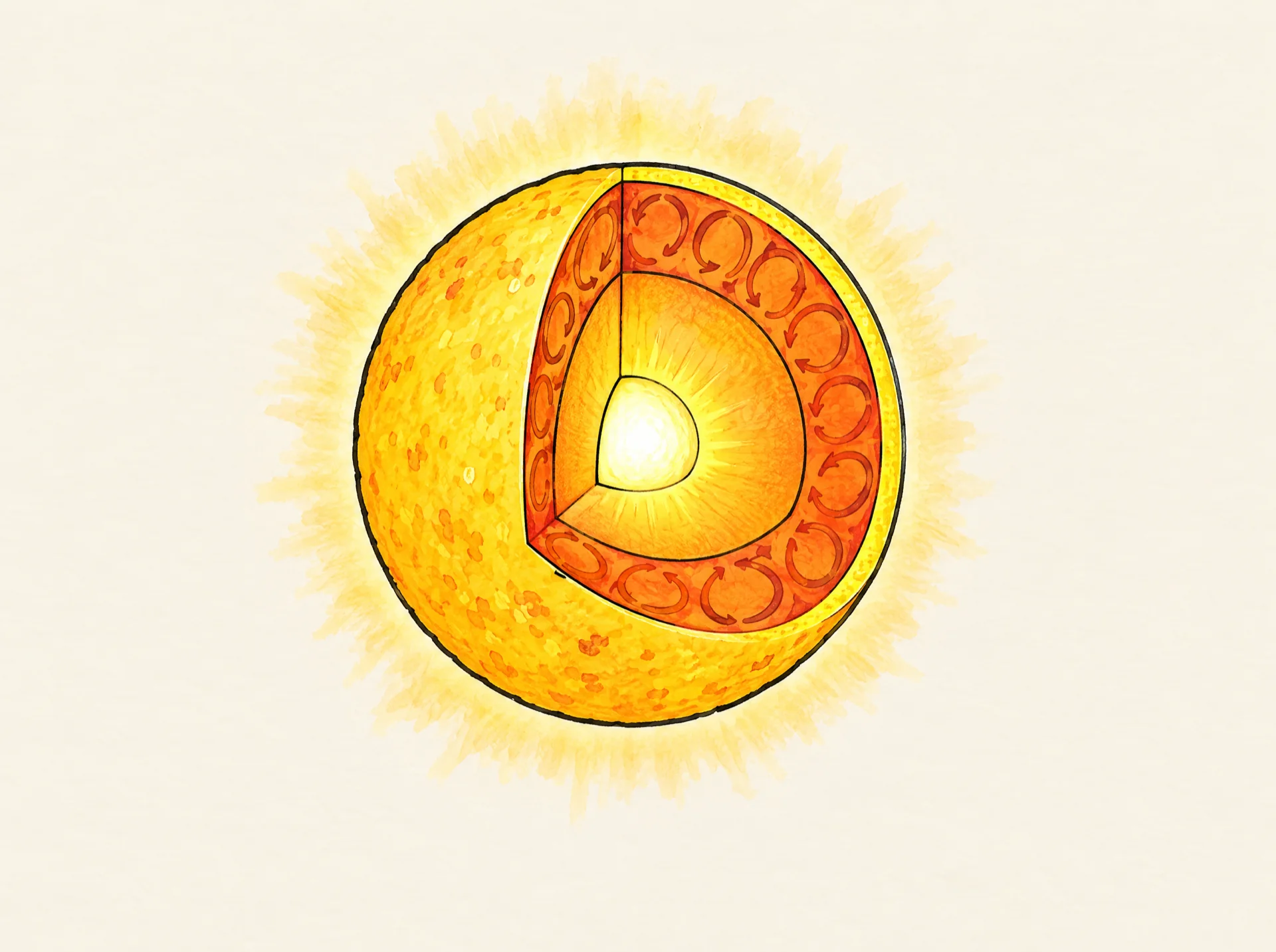
Education · Astronomy lesson
Layers of the Sun animation
Watch the Sun drawn step by step with a wedge cut away to show its layers: the core, the radiative zone, the convection zone and the glowing surface, with the corona around it. A hand-drawn whiteboard animation made from one illustration.
- 1:31 · 2 chapters
- 4:3
- Lines + colour
By Deniffer AlanPublished Tested by Deniffer Alan
Opens Studio with this picture, ready to draw.
The picture it starts from1920 × 1433 px · WEBP
DownloadThe prompt behind the picture
A cutaway diagram of the Sun: a large glowing sphere with one quarter wedge cut away to reveal concentric layers from the centre outwards: a small bright white-yellow core at the centre, a wide radiative zone around it, a convection zone shown with looping swirling cells, and the thin bright surface (photosphere) on the outside. A soft faint corona glow surrounds the whole sphere. Exactly four inner layers plus the outer corona glow, nothing else in the picture, no labels. Plain dark-free background with lots of empty space, 4:3. Coloured pencil and watercolour marker, clean black ink outlines, warm off-white paper, no text.The picture came from an image model; any finished illustration works the same way, including one you drew. Use the prompt as a starting point for your own topic.
How this clip was made
The picture above was made with an image model from the prompt above; WhiteboardAnimation.ai then drew it, stroke by stroke, as the clip at the top of this page.
- Drawn
- Credits used
- 1
Notes from making it
The layers were checked against NASA’s Sun facts page. NASA also lists the chromosphere and the transition zone between the surface and the corona; the picture leaves out these thin layers and shows only the corona’s glow.
Layers of the Sun, step by step
A script to read over it, timed to the drawing: the lines go down first and the colour arrives on the last beat.
- 0:00Line artThe Sun is a huge ball of hot hydrogen and helium, held together by its own gravity.
- 0:10A slice has been cut out of this Sun, so we can see the layers inside.
- 0:19In the middle is the core, the hottest part. Here hydrogen is joined together to make helium, and that powers the Sun’s heat and light.
- 0:29Around the core is the radiative zone. Energy bounces around in it for a very long time: about 170,000 years to get from the core to the top of the next layer.
- 0:38ColourNext comes the convection zone. Big bubbles of hot plasma rise up through it towards the surface.
- 0:48The outside is the photosphere, the part we see from Earth. The corona glows around it as the Sun’s outer atmosphere. Never look straight at the Sun!
Where this layers of the sun animation fits
Use it in an astronomy lesson on the Sun and other stars, to start a unit on the solar system, or as a short clip in a space video for kids. The same process turns your own diagram into a clip.
- Education
- Explainer videos
- Science
Questions