 Whiteboard Animation
Which whiteboard animation tools work in ChatGPT and Claude through MCP
By Deniffer AlanPublished
TL;DR Several tools now run inside ChatGPT, Claude or Cursor through MCP, but they make different things. Voodle Studio, AnkonAI and Sketchie write and narrate a whole whiteboard video from an idea, a script or a document. Easymotion makes motion graphics. Excalimate, Excalidraw, Flett and Collaboard draw diagrams or boards, not finished videos. WhiteboardAnimation.ai draws a finished picture you already have, by hand, lines first and then colour, and gives you an MP4 or WebM. We connected ours in Claude Code on 30 October 2026 and drew a picture through it: the drawing was ready in under two minutes and cost one credit. VideoScribe and Doodly have no MCP server that we could find.
Whiteboard and animation tools with an MCP server, compared
From each tool’s own docs and pricing page, read on 30 October 2026 (US prices). “Not stated” means its docs do not say.
| Tool | What it makes | You give it | Clients its docs name | Sign-in | To connect |
|---|---|---|---|---|---|
| WhiteboardAnimation.ai | A whiteboard animation of your picture: a hand draws its lines, then its colour; saved as MP4 or WebM | A finished PNG, JPEG or WebP | Claude, ChatGPT, Claude Code, Cursor, VS Code, Codex | OAuth, with your WhiteboardAnimation.ai account | Free account: 5 credits to start, 720p with a watermark; 1 credit a drawing |
| Voodle Studio | A narrated whiteboard video, as an MP4 with an unlisted link | An idea, a script or a PDF | ChatGPT, Claude, Claude Code, Codex | OAuth | Every plan, Free included (200 credits once, 720p, watermark); Basic $24.99/month |
| AnkonAI | A narrated whiteboard explainer: MP4 with captions, a captions file, title and description | A topic, a script, or up to 3 files (PDF, text or image) | Claude Code, Claude.ai and Claude Desktop (OAuth); Cursor and Codex (access key); not ChatGPT yet | OAuth in Claude clients; an access key elsewhere | 2 free credits; plans from $23/month; 1 credit = 1 minute of video |
| Sketchie | A narrated whiteboard explainer and an editable scene graph | A text prompt or a document | Claude Code, Claude Desktop, the Claude app (a server you run locally) | An access key from your Sketchie settings | From the Plus plan; price not stated in its docs |
| Easymotion | Motion graphics: a storyboard in the chat, then MP4, MOV or GIF on request | Text prompts, images, logos, data, PDFs | Claude, Claude Code, ChatGPT (web); any app with remote MCP and OAuth | OAuth | Paid plans only; Basic $10/month ($8/month billed yearly) |
| Excalimate | Keyframed animations of Excalidraw diagrams; the app exports MP4, WebM, GIF, SVG and Lottie | Instructions to your agent | VS Code, Cursor, Claude Desktop, Claude Code, Windsurf (a server you run locally) | Not stated | Free and open source (MIT) |
| Excalidraw MCP | Hand-drawn Excalidraw diagrams in the chat, editable; no animation or video in its docs | Instructions to your agent | Claude, ChatGPT, VS Code, Goose | Not stated | Open source (MIT); hosted server cost not stated |
| Flett | An editable board: diagrams, mind maps, sticky notes, slide decks; not video | Content your assistant writes | Claude, Claude Code, ChatGPT, Cursor, Codex | OAuth, with a Google or Microsoft account | Free: 50 board changes a day; paid plans unlimited |
| Collaboard | Whiteboard boards, sticky notes, diagrams, mind maps; not video | Instructions to your agent | ChatGPT, Claude, Cursor, Gemini, Mistral | OAuth | Beta, for selected customers on Advanced or Enterprise |
| VideoScribe | No MCP server found on its site | — | — | — | — |
| Doodly | No MCP server found on its site or help centre | — | — | — | — |
Two things decide most choices. What you start from: an idea or a script (Voodle Studio, AnkonAI, Sketchie), or a picture you already have (WhiteboardAnimation.ai). What you need back: a finished video file, or a diagram you keep editing (Excalidraw, Flett, Collaboard).
Which one to use
- A narrated explainer from a topic or a script: Voodle Studio connects on its free plan; AnkonAI and Sketchie make the same kind of video from a prompt or a document.
- Your own illustration, diagram or product shot drawn by hand: WhiteboardAnimation.ai. It does not write a script or add a voice; it draws the picture you give it and saves the clip, which you then cut together with narration in your editor.
- Animated charts, logos and motion graphics: Easymotion, on a paid plan.
- A diagram that animates element by element: Excalimate, free and open source, run on your own machine.
- A sketch, flowchart or board to keep editing: Excalidraw MCP, Flett or Collaboard. None of them gives you a video.
We connected ours and drew a picture through it
On 30 October 2026, following the steps on our MCP page, signed in as a free account.
| Step | What happened |
|---|---|
| Add the server | claude mcp add --transport http whiteboard-animation https://mcp.whiteboardanimation.ai/mcp; Claude Code listed 9 tools |
| Sign in | In /mcp, Authenticate opened our sign-in page; an emailed 6-digit code, then a consent screen naming “Claude Code (whiteboard-animation)” |
| Ask | “Turn ./water-cycle.webp into a whiteboard animation (subject first, right hand)” with a 724 × 543 WebP |
| Tools Claude called | status (4 credits, free plan), quote (1 credit), create_upload, then create_drawing at 06:37:06 |
| Drawing ready | get_drawing reported it finished at 06:38:48, under 1 min 42 s after it started |
| Video | render_link gave a link; opened in a browser, it saved a 64-second MP4 (724 × 542, 4.4 MB) to downloads, and wait_render confirmed the file name and size |
| Cost | 1 credit (4 left → 3); the free plan’s video carries a WhiteboardAnimation.ai watermark |
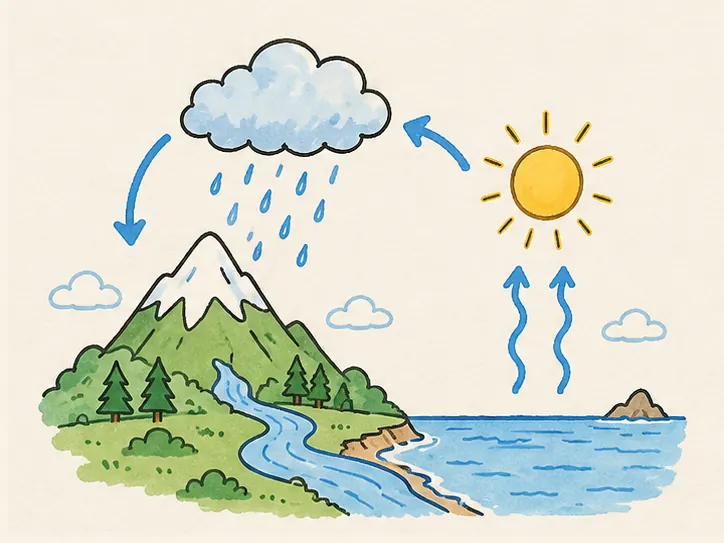
| Example | Line strokes | Colour strokes | As drawn | Line art |
|---|---|---|---|---|
| The water cycle | 366 | 571 | 1:03 | 0:21 |
What we could not run that day: claude.ai, because signing up a new Claude account stopped at an image CAPTCHA; ChatGPT, because OpenAI lists custom MCP servers that make changes (a drawing spends a credit) for Business and Enterprise/Edu workspaces only; Cursor, where the old version on our test Mac read the config and found the 9 tools, but we did not get as far as signing in and drawing. The steps below for those clients come from their own help pages and our MCP page.
Connect it in Claude (web and desktop)
Anthropic’s help centre says custom connectors work on every Claude plan, Free included; Free accounts can add one.
- 01
Add a custom connector
Open Customize → Connectors, choose + Add → Add custom connector, name it
Whiteboard Animationand enterhttps://mcp.whiteboardanimation.ai/mcp. The Add to Claude button on our MCP page fills both in. - 02
Keep OAuth sign-in
Claude detects that the server signs in with OAuth. Review it, choose Continue, then Add.
- 03
Sign in
Choose Connect and sign in with your WhiteboardAnimation.ai account, then approve the connection.
- 04
Turn it on in a chat
Choose + at the lower left of the chat, then Connectors, and switch Whiteboard Animation on.
- 05
Ask for a drawing
Give Claude the link to a finished picture and ask for a whiteboard animation.
Connect it in Claude Code
The client we ran end to end.
- 01
Add the server
In your terminal:
claude mcp add --transport http whiteboard-animation https://mcp.whiteboardanimation.ai/mcp. - 02
Sign in
Start Claude Code, run
/mcp, choose whiteboard-animation → Authenticate. Your browser opens our sign-in; enter the code we email you and approve. - 03
Point it at a picture
Ask it to draw a file or a folder of them. Claude Code uploads each picture itself and gives you the link that saves the videos.
Connect it in ChatGPT
OpenAI’s help centre (read 30 October 2026) lists custom MCP servers with full MCP support for Business and Enterprise/Edu workspaces on ChatGPT on the web, and says Pro users can connect custom MCP servers with read and fetch permissions only. Making a drawing spends a credit, so it is not a read-only action.
- 01
Open Plugins
In ChatGPT on the web, go to Plugins. The Add to ChatGPT button on our MCP page copies the server address on the way.
- 02
Add a custom MCP server
Select + → Add custom MCP server, name it
Whiteboard Animationand pastehttps://mcp.whiteboardanimation.ai/mcp. Choose OAuth. - 03
Create the plugin
Tick I understand and want to continue, choose Create as a plugin and sign in with your WhiteboardAnimation.ai account.
- 04
Use it in a chat
Type @, pick Whiteboard Animation, attach a picture and ask for a whiteboard animation. ChatGPT passes the attached picture to the server, and the drawing plays in the chat.
Connect it in Cursor
- 01
Add the server
Use Add to Cursor on our MCP page, or put this in
~/.cursor/mcp.json(or.cursor/mcp.jsonin one project):{ "mcpServers": { "whiteboard-animation": { "url": "https://mcp.whiteboardanimation.ai/mcp" } } }. - 02
Sign in
Cursor supports OAuth for remote servers; sign in when it asks, from its MCP settings.
- 03
Ask the agent
Point the agent at a picture or a folder of them and ask for whiteboard animations.
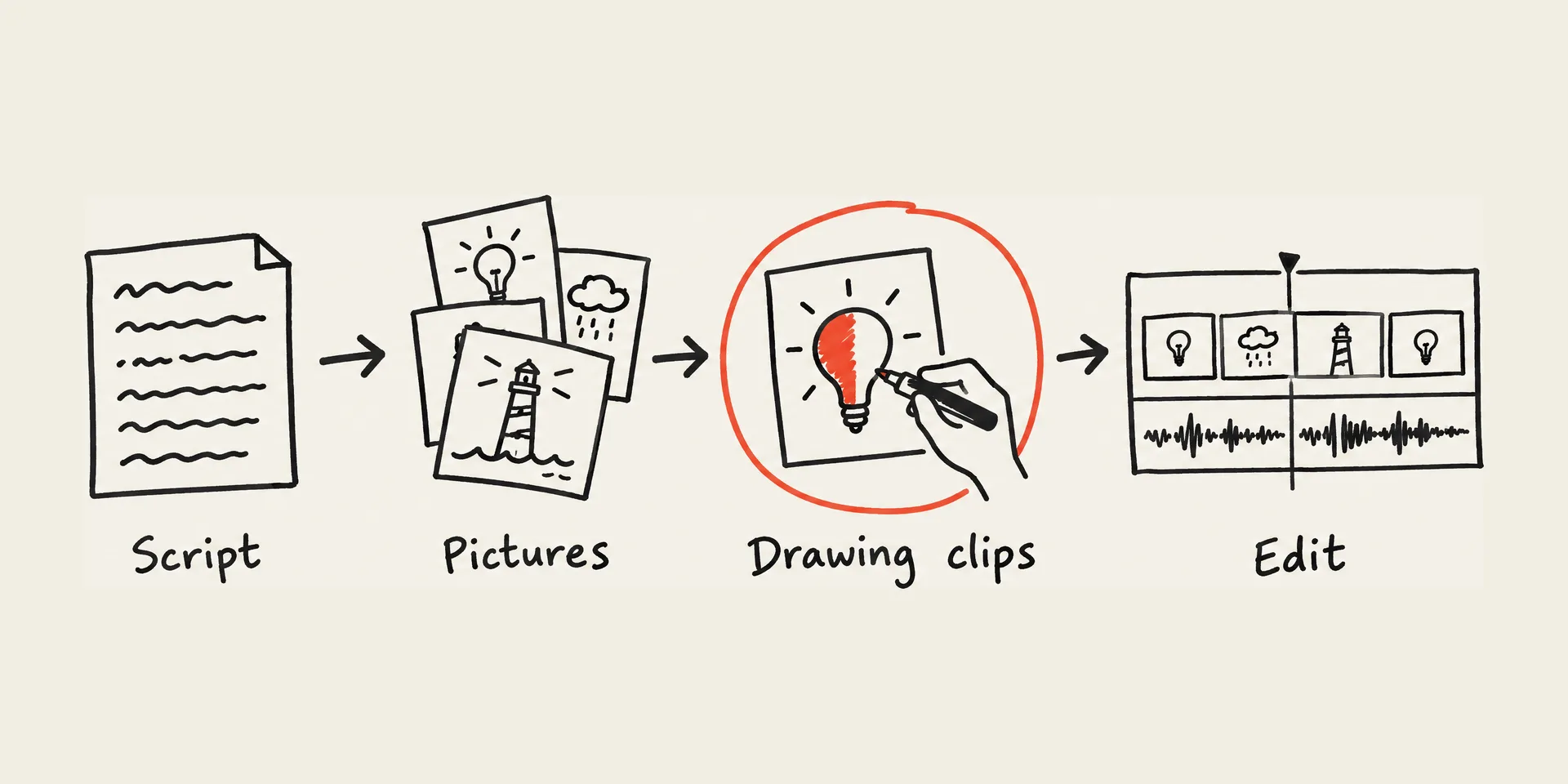
How an agent turns a picture into a whiteboard animation
What happens between your request and the video, in the order Claude Code called our tools.
- 01
Check the account
statusanswers the plan, the credits left and how many drawings may wait;quoteanswers what one drawing costs. - 02
Hand over the picture
create_uploadgives the agent a place to put the file. In ChatGPT the attached picture goes straight tocreate_drawing. - 03
Start the drawing
create_drawingtakes the picture and your choices (subject or background first, which hand) and answers at once with the drawing’s id and a preview page. - 04
Wait for it
get_drawingreports progress; a drawing usually takes a few minutes, and ours took under two. - 05
Save the video
render_linkgives one link for up to 20 drawings, each as MP4 or WebM. Opening it in a browser saves the files to downloads;wait_rendertells the agent when they are saved.
Each drawing costs one credit, the same as in Studio, and a failed drawing gives its credit back. New accounts start with 5 free credits; free videos are 720p with a watermark. Any credit pack or paid plan removes the watermark; transparent export comes with the Pro plan. Prices are on the pricing page.
Sources
Each tool’s own docs and pricing pages, and the clients’ help centres, read on the day given; our own run in Claude Code on 30 October 2026.
- Voodle Studio: integrations (MCP) · read 2026-10-30
- Voodle Studio pricing · read 2026-10-30
- AnkonAI docs (MCP, credits) · read 2026-10-30
- AnkonAI homepage (plans, free credits, watermark) · read 2026-10-30
- Sketchie MCP setup · read 2026-10-30
- Easymotion docs (connecting ChatGPT and Claude) · read 2026-10-30
- Easymotion pricing · read 2026-10-30
- Excalimate · read 2026-10-30
- Excalimate MCP setup · read 2026-10-30
- Excalidraw MCP (GitHub) · read 2026-10-30
- Flett MCP docs · read 2026-10-30
- Collaboard MCP server · read 2026-10-30
- VideoScribe homepage · read 2026-10-30
- Doodly help centre · read 2026-10-30
- Claude help: custom connectors using remote MCP · read 2026-10-30
- OpenAI help: connecting custom MCP servers in ChatGPT · read 2026-10-30
- Cursor docs: Model Context Protocol · read 2026-10-30
- WhiteboardAnimation.ai pricing · read 2026-10-30
FAQ