 Whiteboard Animation
How to make drawing animations from many images at once
By Deniffer AlanPublished
TL;DR Two ways work today. Ask an AI agent to do the whole folder: connect the WhiteboardAnimation.ai MCP server to Claude Code, Cursor or another MCP client, point it at a folder, and it uploads every picture, starts every drawing and gives you one link that saves up to 20 videos at once. We ran three pictures that way on 1 November 2026: all three drawings were finished 31 seconds after the first one started, cost one credit each, and opening the link saved three MP4s in 23 seconds; on the free plan they carry a watermark. Or run an open-source script: whiteboard-animator (PyPI), Image to Animation Offline, Sketch2Motion and smaller GitHub projects turn an image into a reveal video with OpenCV, potrace or Manim plus FFmpeg on your own computer. Only Image to Animation Offline takes a whole folder by itself; with the others you loop over the files yourself.
Ways to batch images into drawing videos
What each one does with many pictures. Our row comes from our own run; the open-source rows from each project’s README, read 1 November 2026. We did not run the scripts.
| Tool | How the picture is drawn | Many pictures at once | You need | Output | Cost |
|---|---|---|---|---|---|
| WhiteboardAnimation.ai through MCP | A hand draws the picture’s own lines, then its colour, region by region | Yes: the agent starts every picture in a folder; one link saves up to 20 videos | An MCP client (Claude Code, Cursor, Claude, ChatGPT…) and a free account | MP4 or WebM per picture | 1 credit a picture; 5 free credits, 720p with a watermark |
| whiteboard-animator (PyPI) | Finds the ink on a white background, writes text word by word, traces outlines, then fills shapes with brush strokes | Several images in one command become one joined video; a separate video per image means a loop | Python 3.10+, FFmpeg; CPU only, an 83 MB text detector comes with the package | MP4 | Free, MIT licence |
| Image to Animation Offline | A grayscale sketch first, then the colour fills in | Yes, on desktop: pick a folder and every image in it becomes a video, in a queue | The Windows or Linux app, or Python; Android app without folder batch | Video file per image | Free, MIT licence, no watermark |
| Sketch2Motion | The image is traced into an SVG (potrace), then Manim draws the paths; a colour mode traces up to 16 colour layers | No: one image at a time in its web interface or scripts | Python 3.9+, Manim, FFmpeg, potrace | MP4, 16:9 or 9:16 | Free; no licence stated on GitHub |
| heatherstreet/whiteboard-animator | Edge detection turns the image into a pencil sketch, revealed left to right with a hand following the edge | No: one image per command | Python 3, OpenCV, Pillow, FFmpeg | MP4, 1920 × 1080 by default | Free; no licence stated on GitHub |
The scripts differ most in what they draw. whiteboard-animator draws a clean, flat-colour whiteboard picture stroke by stroke, and its README says photos, gradients and coloured backgrounds will not work. Sketch2Motion and the left-to-right script turn any image, photos included, into line art first, so the result is a sketch of your picture rather than the picture itself.
We drew three pictures in one request
On 1 November 2026 in Claude Code, with the MCP server connected as in our MCP guide, signed in as a free account with 3 credits left. Three pictures from our examples in one folder, one prompt.
The prompt: “Turn every picture in ./pictures into a whiteboard animation in one batch (subject first, right hand): start all of them, then wait until all are finished. Then make one render link for all of them as MP4 on paper and print the link.” Claude Code called status and quote, uploaded the three files, started three drawings within three seconds of each other and checked them with get_drawing until all were done.
| Picture | Started | Drawing finished | Time | Credits | Saved MP4 |
|---|---|---|---|---|---|
| Light bulb | 02:06:43 | 02:06:58 | 15 s | 1 | 47 s video, 724 × 542, 2.6 MB |
| Solar system | 02:06:48 | 02:07:06 | 18 s | 1 | 54 s video, 724 × 542, 3.0 MB |
| Lighthouse | 02:06:52 (queued; drawing by 02:07:06) | 02:07:14 | 22 s | 1 | 74 s video, 724 × 542, 6.1 MB |
| Whole batch | Prompt sent 02:06:02 | Link ready 02:07:19 | 1 min 17 s | 3 (3 left → 0) | All three saved 23 s after the link was opened |

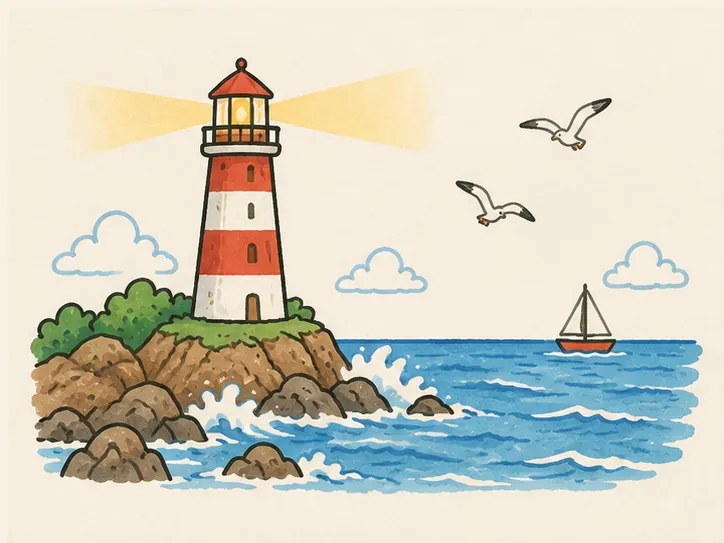
The lighthouse from our batch at a quarter, half, three quarters and the end of its 74 seconds: outlines first, then colour. The free plan’s watermark sits at the lower right.
- One link for the batch.
render_linkreturned one link for all three videos, valid for an hour. Opening it in a browser rendered them one after another and saved each to downloads; the browser asks once whether the site may download several files.wait_renderthen gave the agent each file name and size. - The queue. The free plan let one drawing wait while others drew: the third picture was accepted at once and started when a slot opened. Our pricing page lists up to 3 drawings waiting on Starter and up to 20 on Pro.
- Size. The pictures were 724 × 543, so the videos kept that size; on the free plan videos go up to 720p. The watermark goes with any credit pack or paid plan.
| Example | Line strokes | Colour strokes | As drawn | Line art |
|---|---|---|---|---|
| A simple circuit | 68 | 424 | 0:47 | 0:07 |
| The solar system | 258 | 326 | 0:54 | 0:14 |
| Lighthouse bay | 386 | 421 | 1:14 | 0:32 |
Batch a folder with an AI agent
Connecting the server takes a minute; the steps for each client are on our MCP page and in the MCP guide.
- 01
Connect and sign in once
Add the Whiteboard Animation MCP server to Claude Code, Cursor, Codex or another client and sign in with your account. A coding agent that can read your files is the easiest for folders.
- 02
Put the pictures in one folder
Finished PNG, JPEG or WebP pictures. Each one is drawn as it is: we do not write a script, add a voice or make the picture for you.
- 03
Ask for the whole folder
For example: “Turn every picture in ./pictures into a whiteboard animation (subject first). Start all of them, wait until they are finished, then give me one link that saves them as MP4.”
- 04
Open the link
Open it in your browser, allow several downloads when asked, and keep the page open until every file is saved. One link holds up to 20 drawings; for more, ask for another link.
- 05
Cut them together
Each picture comes back as its own clip, ready to place over narration in your video editor.
Each picture costs one credit, the same as in Studio, and a failed drawing gives its credit back. New accounts start with 5 free credits; free videos are 720p with a watermark. Any credit pack or paid plan removes the watermark and unlocks 1080p; transparent export comes with the Pro plan. Prices are on the pricing page.
Open-source scripts for batch drawing videos
What each project’s own README says it does, read 1 November 2026. All run on your own computer and need FFmpeg.
whiteboard-animator (PyPI)
pip install whiteboard-animator, thenwhiteboard-animate scene.png --duration 8 -o scene.mp4. It treats every blob of dark pixels on white as a part to draw, orders them the way a hand would and streams the frames to FFmpeg; with a narration file it paces the drawing to the audio. Several images in one command are joined into one video. Version 0.1.1, MIT; it is the engine behind Kinoslide.Image to Animation Offline
A free desktop and Android app built on OpenCV and NumPy. On Windows and Linux you can choose a folder and it makes one sketch-style video per image in a queue; speed and frame rate are adjustable, and a colour option draws the grayscale sketch first, then fills the colour. MIT, no watermark.
Sketch2Motion
Converts a photo, sketch or doodle into an SVG with potrace and renders the paths drawing themselves with Manim, in landscape or portrait. A colour pipeline keeps up to 16 colours. It runs as a local web page (Gradio) for one image at a time.
heatherstreet/whiteboard-animator
A single Python script: edge detection and dodge blending make a pencil sketch, revealed left to right with a hand image following the edge, compiled with FFmpeg. Its own to-do list names path-based drawing as not done yet.
For the scripts that take one image per command, a batch is a loop in your shell or a short script over the folder. None of them reads your picture’s colour regions the way a person would colour them in: they reveal a sketch or fill shapes by area.
Run the batch on a schedule
From Claude Code’s own documentation, read 1 November 2026. We did not run a scheduled batch.
- Claude Code Desktop scheduled tasks start a new session at the time you choose, on your machine, with your local files and the MCP servers in your config; they fire only while the app is open and the computer is awake.
- Cloud scheduled tasks run without your computer, but work on a fresh copy of a repository rather than your local folders, with connectors set per task.
- `claude -p "<prompt>"` runs Claude Code once without the interactive screen, so any scheduler on your computer can start it, for example each morning over a folder of new pictures.
- `/loop` repeats a prompt on an interval while a session stays open.
The videos are made when someone opens the batch link in a browser, and the link lasts an hour. An unattended run gets every picture drawn and gives you the link; open it within the hour, or ask the agent for a new link later, to save the files.
Which one to use
- Finished illustrations or diagrams, drawn line art first and then coloured, without installing anything: WhiteboardAnimation.ai through MCP. Five pictures are free with a watermark.
- Clean marker-style whiteboard pictures, free, on your own machine: whiteboard-animator from PyPI.
- A folder of photos turned into pencil-sketch videos with no setup: Image to Animation Offline on Windows or Linux.
- Smooth vector line drawing for logos and doodles: Sketch2Motion.
Sources
Each project’s own README or package page and Claude Code’s documentation, read on the day given; our own run in Claude Code on 1 November 2026.
- whiteboard-animator (GitHub, masihsultani) · read 2026-11-01
- whiteboard-animator on PyPI · read 2026-11-01
- Image to Animation Offline (GitHub, daslearning-org) · read 2026-11-01
- Sketch2Motion (GitHub, leeyeel) · read 2026-11-01
- Whiteboard Animator (GitHub, heatherstreet) · read 2026-11-01
- Claude Code docs: run Claude Code programmatically · read 2026-11-01
- Claude Code docs: run prompts on a schedule · read 2026-11-01
- Claude Code docs: Desktop scheduled tasks · read 2026-11-01
- WhiteboardAnimation.ai pricing · read 2026-11-01
FAQ